In this guide (8 sections)
We earn a commission if you buy through links on this page, at no extra cost to you. It never changes what we recommend. How we make money.
How we picked these
- Review themes from 560 verified-buyer and owner reviews on retailer sites, so every pick shows what buyers praise and complain about.
- 27 owner posts, user discussions and expert reviews read across 17 sources.
- Every spec checked against 14 maker and retailer pages.
- We did not test these products ourselves, and we say so. All sources are linked at the end of this guide.
Our top picks
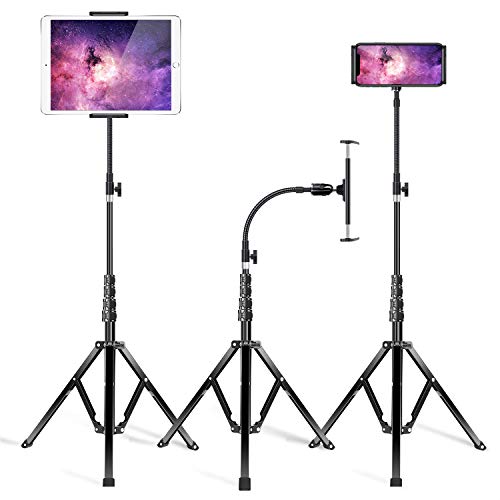 Best complete iPad tripod stand · 3.3/5elitehood Metal iPad Tripod Stand
 Best iPad tripod mount overall · 4.2/5Ulanzi U-Pad III Metal iPad Tripod Mount
 Best iPad tripod kit for large iPads · 3.3/5GRIFITI Nootle Large Universal Tablet Mount Adjustable Stand Tripod
 Best iPad tripod mount with a remote · 3.8/5KobraTech TabMount 360 iPad Tripod Mount
 Best compact mount for iPad mini and 11-inch · 3.6/5JOBY GripTight PRO Tablet Mount
The short answer
- If you own a camera tripod, my pick is the Ulanzi U-Pad III: an aluminum mount whose 3.93 to 9 in clamp holds every current iPad, including a 13-inch iPad Pro in a slim case.
- Without a tripod, the elitehood Metal iPad Tripod Stand is the complete option: an aluminum floor stand that reaches 72 in with its gooseneck.
- The GRIFITI Nootle kit suits large iPads on the move; the KobraTech TabMount 360 adds a Bluetooth remote; the JOBY GripTight PRO fits iPad mini and 11-inch models only.
- Measure your iPad's short side with its case before you buy: a 13-inch iPad Pro is 8.48 in wide, and the JOBY tops out at 7.5 in.
The best tripod for iPad is the one whose clamp actually fits your iPad’s width with its case on. If you own a camera tripod, I’d add the Ulanzi U-Pad III, an aluminum mount that opens to 9 in, wide enough for a 13-inch iPad Pro. If you don’t, the elitehood Metal iPad Tripod Stand is a complete stand that reaches 72 in. I compared five picks from maker specs and owner reports; I did not test them myself. Filming games from the sideline? My tripods for filming sports guide covers taller stands.
iPad Tripod Comparison by Clamp Width and Height
An iPad tripod is decided by clamp range first: a 13-inch iPad Pro is 8.48 inches wide, so its mount must open past that, plus your case.

The table lists maker figures; a floor stand includes legs, while a mount needs a camera tripod or monopod you own.
| iPad tripod | Type | Clamp or fit | Max height | Weight | Extras |
|---|---|---|---|---|---|
| elitehood Metal iPad Tripod Stand | Stand | 4.7 to 13 in devices | 72 in | 3.6 lb | Gooseneck, bag |
| Ulanzi U-Pad III | Mount | 3.93 to 9 in | Your tripod | 199 g | Cold shoe, Arca |
| GRIFITI Nootle kit | Stand + mount | 9.5 to 14.5 in tablets | About 6 ft | 2.4 lb | Ball head, case |
| KobraTech TabMount 360 | Mount | 6.25 to 9.30 in | Your tripod | Not published | Remote, cold shoe |
| JOBY GripTight PRO | Mount | 5 to 7.5 in | Your tripod | 145 g | Tilt |
Now match that to the iPad you own. Apple lists the 11-inch iPad Pro at 6.99 in wide and the iPad mini at 5.22 inches:
| Mount | iPad mini (5.22 in) | 11-inch (6.99 to 7.02 in) | 13-inch (8.46 to 8.48 in) |
|---|---|---|---|
| Ulanzi U-Pad III | Yes | Yes | Yes, about 0.5 in spare |
| KobraTech TabMount 360 | Long side only | Yes | Yes, about 0.8 in spare |
| JOBY GripTight PRO | Yes | Yes, about 0.5 in spare | No |
| Grifiti large mount | No | Yes | Yes |
How I Picked Each iPad Tripod
Every iPad tripod here is recommended by at least two independent guides or owner threads, and each has its own Amazon US listing I checked by hand.

My shortlist came from FixThePhoto, Digital Trends, Padholder and ProVideo Coalition, plus MacRumors, GolfWRX and Reddit owner threads. I dropped the Caddie Buddy mount because it fits only third and fourth-generation 12.9-inch iPad Pros and the KDD mount for lack of a second written recommendation. I then read 27 owner reviews and threads and scored each pick on our Best Tripod Score rubric.
From our notes: The 8.48-inch width of the 13-inch iPad Pro rewrote this list. Most roundups call their mounts universal, so I put each clamp range next to Apple’s dimensions. The JOBY GripTight PRO stops at 7.5 in, nearly an inch short. The KobraTech starts at 6.25 in, wider than an iPad mini. Only the Ulanzi covers every current iPad on its short side, and even it leaves about half an inch for a case.
The 5 Best Tripods for iPad
The best tripod for iPad depends on two things: whether you already own a tripod, and how wide your iPad is with its case.

elitehood Metal iPad Tripod Stand: best complete iPad tripod stand
3.3Best Tripod Spec Score out of 5
- Stability6/10
- Portability (weight and folded length)5/10
- Working height9/10
- Build (materials, leg locks, head)7/10
- Value7/10
I give it the top height score for 72 in and solid build, but the gooseneck sway and 3.6 lb base cost it on stability and portability.
What we like
- Extends from 30 to 72 in, the tallest pick here
- Metal clamp with four springs and a 360° ball joint
- Tripod, holder and carry bag in one box
What we don't like
- Owners report the gooseneck can feel springy and the lock could be firmer
- 3.6 lb and a wide base, so it is not a travel stand
What owners and reviewers say from 4 reviews and posts we read
Praised for
- Easy to set up and portable enough to move between rooms
- Metal build feels better than plastic stands
- Holds a full-size iPad for music and video calls
Common complaints
- The gooseneck can feel springy rather than locked in place
- Some owners want a firmer locking mechanism
Read on: r/ipadmusic: Good arm/stand for iPad · Facebook drummers group: Best iPad Pro stand for drummers? · Facebook group: Stand that can hold full size iPads or tablets · Desertcart: elitehood Metal iPad Tripod Stand review summary
Who it's for: Teachers, musicians, presenters and parents filming indoors who want one box with legs, holder and bag. Key caveat: the gooseneck can spring and sway, so I keep it short for video.
The elitehood Metal iPad Tripod Stand is an aluminum alloy floor tripod with a gooseneck tablet holder from elitehood, and it is my pick when you have no tripod at all. The legs and gooseneck arm together extend from 30 to 72 in, the tallest reach here, and the metal clamp uses four springs to grip 4.7 to 13 in devices. A ball joint behind the clamp rotates 360° between portrait and landscape.
Owners on r/ipadmusic and in drummer groups recommend it for music stands and lessons, and a tablet-stand group member praises the quality of Elitehood’s materials. The common complaint is the gooseneck: some owners find it springy and want a firmer lock. For video I would keep the neck short and the iPad close above the legs.
Ulanzi U-Pad III Metal iPad Tripod Mount: best iPad tripod mount overall
4.2Best Tripod Spec Score out of 5
- Stability8/10
- Portability (weight and folded length)9/10
- Build (materials, leg locks, head)9/10
- Value8/10
I score it highest on build and portability for the 199 g aluminum body, and it fits every iPad width; it loses a point because the head is yours to supply.
What we like
- Clamp opens 3.93 to 9 in, the widest range here
- Aluminum body with a top lock and a back button
- Cold shoe, 1/4"-20 thread and Arca-type dovetails
What we don't like
- Thick or rugged cases can push a 13-inch iPad past the 9 in limit
- No ball head included; angle comes from your tripod head
What owners and reviewers say review themes from 13 owner reviews, plus 6 posts and reviews we read
Praised for
- Sturdy metal grip that holds an 11-inch iPad firmly on a tripod
- Spigot and Arca options let photo assistants rig it on stands and arms
- Clamps big tablets that plastic mounts cannot
Common complaints
- Owners take the iPad out of its case to make it fit
- Some question whether the clamp is wide enough for a 12.9-inch iPad
Read on: B&H: Ulanzi U-Pad III customer reviews (13 reviews) · MacRumors Forums: Looking for robust adjustable stand/tripod mount · r/Photoassistants: best ipad mount reccos? · r/Photoassistants: Tips on protecting and rigging a new iPad Pro · r/iPadPro: A clamp big enough to hold the iPad Pro
Who it's for: Creators, photo assistants and coaches with a camera tripod or light stand. Key caveat: a 13-inch iPad leaves about half an inch of clamp, so thick cases may not fit.
The Ulanzi U-Pad III is an aluminum tablet tripod mount from Ulanzi, and it is the one I’d screw onto a camera tripod for any iPad. Ulanzi’s manual gives a 10 to 23 cm (3.93 to 9 in) clamp range, B&H lists 199 g, and it has a cold shoe mount for a mic or light, a 1/4”-20 thread and Arca-type dovetails that drop into most photography ball head clamps.
Photo assistants on Reddit rig Ulanzi’s aluminum iPad mounts on light stands with a spigot, and B&H owners call the U-Pad III sturdy with an 11-inch iPad. The catch is width: one r/Photoassistants owner takes the iPad out of its case, and a MacRumors reply questions the 12.9-inch fit. The Amazon US listing I checked was sold by a third-party seller, so check the seller before you buy.
GRIFITI Nootle Large Universal Tablet Mount Adjustable Stand Tripod: best iPad tripod kit for large iPads
3.3Best Tripod Spec Score out of 5
- Stability6/10
- Portability (weight and folded length)7/10
- Working height8/10
- Build (materials, leg locks, head)6/10
- Value7/10
I rate it well on height and portability for a 2.4 lb kit, but a light stand and reported swivel-head wear hold stability and build to 6.
What we like
- Stand, mount, mini ball head and travel case in one 2.4 lb kit
- Large mount takes standard to 13-inch iPads, with a 5/8 in lip for cases
- Parts thread onto any 1/4"-20 tripod or Grifiti clamp
What we don't like
- Durability issues have been reported with the swivel head
- Not for the iPad mini; some thick cases do not fit
What owners and reviewers say review themes from 2 owner reviews, plus 4 posts and reviews we read
Praised for
- Golfers name it for holding an iPad to film swings
- Works with an existing tripod for art and lessons
- Holds a large iPad with or without a case
Common complaints
- Swivel head durability issues reported
- Not every case or cover fits the clamp
Read on: GolfWRX: Best iPad Mount & Tripod? · Grifiti: Nootle Universal Large Tablet Mount customer reviews (2 reviews) · Apple Support Community: Tripod Mount
Who it's for: Golf coaches, lecturers and sports parents with a standard or large iPad. Key caveat: the large mount is not made for the iPad mini, and the light stand needs weight in wind.
The GRIFITI Nootle kit is a tablet tripod kit from Grifiti: an aluminum stand that reaches about 6 ft, a spring-loaded large-tablet mount, a mini ball head and a travel case. I picked it for 11 to 13-inch iPads at a range, gym or lecture hall. The mount has a 5/8 in lip that clears most cases, and Grifiti says it is not for the iPad mini.
A GolfWRX member answered a swing-filming thread with “A Nootle for the iPad,” and a Grifiti buyer uses the mount on a tripod for artwork. Swivel-head durability issues have been reported, and some cases do not fit the clamp.
KobraTech TabMount 360 iPad Tripod Mount: best iPad tripod mount with a remote
3.8Best Tripod Spec Score out of 5
- Stability7/10
- Portability (weight and folded length)8/10
- Build (materials, leg locks, head)7/10
- Value9/10
I give it the best value score for the remote and ball head in the box; the plastic parts and fiddly landscape switch keep build at 7.
What we like
- Bluetooth remote included, rated to 30 feet
- Metal ball head swings between landscape and portrait
- Two 1/4" threads and a cold shoe
What we don't like
- Owners find the switch to landscape fiddly and the screw short in portrait
- Clamp minimum of 6.25 in is wider than an iPad mini
What owners and reviewers say review themes from 20 owner reviews, plus 5 posts and reviews we read
Praised for
- Holds an iPad Pro 12.9 firmly
- Remote saves walking back to the iPad
- Fast swap between portrait and landscape on the ball head
Common complaints
- Hard to adjust into landscape mode
- The screw is too short for some portrait setups
Read on: KobraTech: TabMount 360 customer reviews (20 reviews) · Facebook group: iPad tripod stand for 12.9 inch iPad Pro · Desertcart: KobraTech TabMount 360 owner review
Who it's for: Solo creators filming themselves with an 11 or 13-inch iPad on a tripod they own. Key caveat: the clamp starts at 6.25 in, so an iPad mini only fits on its long side.
The KobraTech TabMount 360 is a screw-lock iPad tripod mount from KobraTech with a metal ball head and a Bluetooth remote, and it is my value pick for filming yourself. KobraTech lists a 6.25 to 9.30 in clamp, two 1/4” threads, a cold shoe and a remote that works from up to 30 feet.
Owners on KobraTech’s page praise how firmly it holds an iPad Pro 12.9. Their complaints are fiddly landscape adjustment and a screw that runs short in some portrait setups. An iPad mini, at 5.22 in, only fits on its long side.
JOBY GripTight PRO Tablet Mount: best compact mount for iPad mini and 11-inch
3.6Best Tripod Spec Score out of 5
- Stability7/10
- Portability (weight and folded length)9/10
- Build (materials, leg locks, head)7/10
- Value6/10
I rate it the most portable mount and secure in landscape, but the 7.5 in ceiling and weak portrait hold keep value and stability lower.
What we like
- 145 g and 5.4 in long, the smallest mount here
- Sliding stainless plates lock to a precise width
- Tilt adjustment plus portrait or landscape rotation
What we don't like
- Tops out at 7.5 in, so no 12.9 or 13-inch iPads
- Owners say portrait mode has no bottom support
What owners and reviewers say review themes from 525 owner reviews, plus 8 posts and reviews we read
Praised for
- Fits a 10.2-inch iPad and an 11-inch iPad Pro
- Turns 90 degrees for portrait or landscape and tilts up and down
- Easy to attach and sturdy in landscape on a tripod
Common complaints
- Grips only the sides in portrait, with no support underneath
- One owner felt it was not solid enough for an iPad and switched
- Too narrow for a large Surface Pro
Read on: Best Buy: JOBY GripTight PRO Tablet Mount questions and answers (525 reviews) · K&M Camera: JOBY GripTight PRO Tablet Mount
Who it's for: Owners of an iPad mini, 10th-generation iPad or 11-inch iPad who want a small mount for a camera tripod. Key caveat: it cannot open wide enough for any 13-inch iPad.
The JOBY GripTight PRO Tablet Mount is a locking tablet tripod mount from JOBY, and I’d choose it for an iPad mini, a 10th-generation iPad or an 11-inch model. Its stainless steel plates slide from 5 to 7.5 in and lock, it weighs 145 g, and the mount tilts, turns 90 degrees and also takes a smartphone.
Best Buy owners confirm it holds a 10.2-inch iPad and an 11-inch iPad Pro. One owner warns that in portrait it “grips the tablet on the sides, but there’s no support at the bottom,” so I mount landscape. Another felt it was not solid enough for an iPad. No 13-inch iPad fits.
Which one should you get
Pick by what you own: a tripod means a mount sized to your iPad, no tripod means a complete stand.
- Camera tripod, any iPad up to 13-inch: Ulanzi U-Pad III.
- No tripod, filming indoors or reading music: elitehood Metal iPad Tripod Stand.
- 11 to 13-inch iPad at the range or gym: GRIFITI Nootle kit.
- Filming yourself and want a remote: KobraTech TabMount 360.
- iPad mini or 11-inch, smallest kit: JOBY GripTight PRO.
How to Mount an iPad on a Tripod
To mount an iPad on a tripod, screw a tablet mount onto the tripod head, clamp the iPad in landscape, and lock everything before you let go.

- Measure your iPad’s short side with its case on and check it against the mount’s clamp range.
- Screw the mount’s 1/4”-20 thread onto the tripod plate, or slide its Arca-type dovetail into the head clamp.
- Rotate the mount to landscape mode before inserting the iPad; portrait mode leaves side-only clamps without support underneath.
- Open the clamp, seat the iPad against the bottom pads, close it and turn the lock.
- Spread the legs fully and keep the center column down.
- Tilt with the tripod head, then tug the iPad gently to check it does not slide.
iPad Tripod Problems Owners Run Into, and the Fix
Most iPad tripod complaints come down to four things: a clamp too narrow for a large iPad, plastic mounts, drooping goosenecks and tipping in wind.
- The 13-inch iPad will not fit. A MacRumors reply notes “the clamps might not be wide enough for the bigger iPad.” Buy a mount that opens past 8.48 in, such as the Ulanzi or KobraTech, or use a slim case.
- Plastic mounts are hard to re-aim. The MacRumors thread opens with a complaint about “cheap plastic” mounts that are “a pain to adjust, say, the angle.” An aluminum mount on a real ball head fixes both.
- The gooseneck droops. A GolfWRX owner says a flexible arm “won’t support the weight of my iPad.” A 13-inch iPad Pro weighs 1.28 lb; keep goosenecks short, or use a rigid mount for video.
- The tripod blows over. Golfers warn about the tripod that falls “and you crack a screen.” On r/videography, owners weigh tripods down with weights or heavy bags; hang one, or a sandbag, from the hook to lower the center of gravity, and spread the legs wide.
iPad Tripod Height for Filming Sports, Golf and Video Calls
An iPad tripod for filming sports needs 6 ft or more to see over the crowd, while golf swings and video calls need hand or eye level.
- Video recording at sports games: the elitehood (72 in) or Grifiti stand (about 6 ft) clears a standing crowd; add weight on a windy sideline.
- Golf swing: set the iPad at hand height behind the ball on the Grifiti kit, as GolfWRX members do.
- Video calls, teleprompter apps, time-lapse and stop motion: any mount on a tripod at eye level, or angled down over a table, works.
If you film on an iPhone as often as an iPad, my tripods for live streaming guide covers phone clamps next.
Questions photographers ask
What is the best tripod for iPad?
The best tripod for iPad is a metal mount on a sturdy tripod if you own one: I pick the Ulanzi U-Pad III, whose 3.93 to 9 in clamp fits every current iPad. Without a tripod, I'd buy the elitehood Metal iPad Tripod Stand, which reaches 72 in.
Can I put an iPad on a regular camera tripod?
Yes, an iPad goes on a regular camera tripod with a tablet mount that has a 1/4"-20 thread, the same screw size as a camera plate. Pick a mount whose clamp range covers your iPad's short side, then aim it with the tripod's ball head or pan head.
Will a tripod mount fit a 13-inch iPad Pro?
A tripod mount fits a 13-inch iPad Pro only if its clamp opens past 8.48 in, the iPad's width. The Ulanzi U-Pad III (9 in), KobraTech TabMount 360 (9.30 in) and Grifiti large mount fit; the JOBY GripTight PRO (7.5 in) does not.
Can an iPad tripod mount fit an iPad mini?
Yes, most iPad tripod mounts fit an iPad mini, which is 5.22 in wide. The Ulanzi U-Pad III and JOBY GripTight PRO grip its short side; the KobraTech starts at 6.25 in, so it holds the mini only on its long side, and the Grifiti large mount is not made for it.
Is a gooseneck iPad stand or a tripod mount better?
A tripod mount is steadier for video, because a gooseneck can spring and sway under a full-size iPad. A gooseneck stand like the elitehood is better for reading, music and video calls, where reach and angle matter more than a still frame.
Why you can trust this guide
- Products are checked against manufacturer specifications, user manuals and long-term owner reports.
- Each pick is scored on the Best Tripod Score: stability, portability (weight and folded length), working height, build quality and value. Scores come from published specs and owner reports, not hands-on testing.
- We never accept payment for placement. Affiliate commissions do not affect rankings.
Last reviewed . Read our research process and editorial policy, or report an error.
Sources
- Apple: iPad Pro technical specifications
- Apple: iPad mini technical specifications
- Apple: iPad Air technical specifications
- B&H: Ulanzi U-Pad III Metal Tripod Mount
- Manuals+: Ulanzi U-Pad III Universal Metal Tablet Mount manual
- KobraTech: TabMount 360 iPad Tripod Mount
- K&M Camera: JOBY GripTight PRO Tablet Mount specs
- Grifiti: Nootle Universal Large Tablet Mount
- eBay: elitehood Metal iPad Tripod Stand 72 in listing
- FixThePhoto: Best iPad tripod mounts
- Digital Trends: The best tripods for the iPad
- Padholder: Top 5 iPad tripod stands compared
- ProVideo Coalition: Tablet holders buying guide
- r/videography: Filming in strong winds
Reviews and discussions we read
- r/ipadmusic: Good arm/stand for iPad
- Facebook drummers group: Best iPad Pro stand for drummers?
- Facebook group: Stand that can hold full size iPads or tablets
- Desertcart: elitehood Metal iPad Tripod Stand review summary
- B&H: Ulanzi U-Pad III customer reviews (13 reviews)
- MacRumors Forums: Looking for robust adjustable stand/tripod mount
- r/Photoassistants: best ipad mount reccos?
- r/Photoassistants: Tips on protecting and rigging a new iPad Pro
- r/iPadPro: A clamp big enough to hold the iPad Pro
- GolfWRX: Best iPad Mount & Tripod?
- Grifiti: Nootle Universal Large Tablet Mount customer reviews (2 reviews)
- Apple Support Community: Tripod Mount
- KobraTech: TabMount 360 customer reviews (20 reviews)
- Facebook group: iPad tripod stand for 12.9 inch iPad Pro
- Desertcart: KobraTech TabMount 360 owner review
- Best Buy: JOBY GripTight PRO Tablet Mount questions and answers (525 reviews)
- K&M Camera: JOBY GripTight PRO Tablet Mount

Best Tripod Editorial Team
Research & editorial
We research tripods, monopods and heads for photographers and video creators: real working height with and without the center column, load capacity against the gear you actually shoot, packed length for a carry-on, leg-lock speed and Arca-Swiss compatibility. Every guide follows our published research process and editorial policy.